
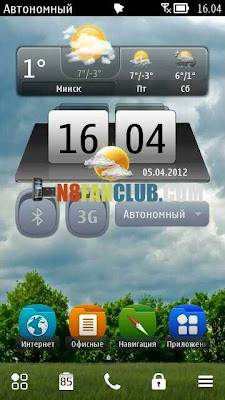
+By+Dima-zh1.jpg)
Digital Clock MIUI Style Widget has been created by Dima-zh1 for your Symbian Smart Phone. Compatible with unlocked / hacked Belle Smart Phones only.
How To Install:
1. Make sure your device is unlocked with Norton Hack to avoid certificate / update / component built in errors.
2. Remove any previously installed digital clock widget from your device, if you haven’t installed one, ignore this step.
3. Install it on C:/ & then Reboot
4. Add the widget to a HomeScreen.
Click below to download
N8Fanclub.com_Digital_Clock(MIUI)_By_Dima-zh1_unsigned.zip
N8Fanclub.com_Digital_Clock(MIUI)_By_Dima-zh1_unsigned.zip
N8Fanclub.com_Digital_Clock(MIUI)_By_Dima-zh1_unsigned.zip
What is that widget above the clock widget? And how did you get the additional two icons in the bottom-most bar? Admins please reply, I want that on my N8 too. Thanks…. :):)
To get those additional icons, you need Extra Buttons App, search for it on our website.
please help, how do i get rid off the component built in error, help me plz and thank you !
Okay thanks, I got those additional buttons, and it looks awesome… But I’m having a problem now… I cannot switch back to the original digital clock widget, the one which came with Belle. If I uninstall it, the previous digital widget won’t show up… Its there any way I can get that back?