
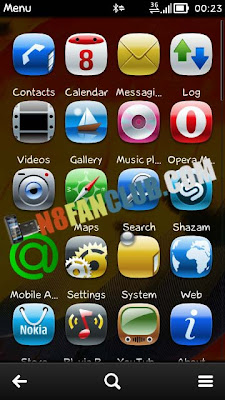
Warning: This is supposed to work on Symbian Belle / Belle Refresh, BELLE FP1 and Belle FP2. Use it at your own Risk.For Symbian Belle / Belle Refresh and Belle FP1
Download
N8FanClub.com_ExtendedMenuGridForBellev1.7_FP1.zip
N8FanClub.com_ExtendedMenuGridForBellev1.7_FP1.zip
N8FanClub.com_ExtendedMenuGridForBellev1.7_FP1.zip
There are two folders in archive:
– First with all features
– Second contains all features, but with enabled scroll bar.
Unpack the archive in following order, and Reboot the phone.
- Extract in C:/sys/hash/Menurenderer.dll
- Extract in F:/sys/bin/Menurenderer.dll
If anything goes wrong, just pull out your microSD card and restart your device to revert the changes you had made.
Updated v1.7!!! The changes list:
1) More icons in portrait and landscape. 4×5 and 7×3.
2) Allow rename applications in menu. (You have to delete the C:/sys/bin/menurenderer.dll, if you had used this mod earlier.)
3) Fixed icons alignment
4) Fixed text alignment.
5) Enabled function, to allow create folders in folders
6) Disabled scroll bar.
 |
| In landscape you will see the 7×3 grid |
For Belle FP2

Extract the zip archive and you’ll see these two folders
- Extended Menu Grid FP2 (4×5)
- Extended Menu Grid FP2 (3×5)
Choose anyone of the grid style folder and from that folder copy SYS folder in root C:/ and restart your device.
How to remove Extended Menu Grid Mod?
If you would like to remove this extended menu grid, just navigate to c:/sys/bin with X-plore after applying open4all patch and rename “menurenderer.dll” to something else and then delete it.
Not working….. Xplore can’t create directory Did it by computer but nothing happened. Using Belle 609
We have updated the tutorial, there was some mistake, please follow it again.
working! Since i didnt have the E and F sys dir’s, i had to create them with x-plore. Belle 609. Thanks for sharing.
did u just create those paths or u had deleted some stuff as well???
it worked with c7??????
working fine on my Nokia 701 , thanx… 🙂
but there is a need to rework d icon size,as certain icons are too big/stretched that they hide the caption of other icons,also spoils d view….
have a look here:
http://myfreewap.com/m/uploads/srx_scr000010.jpg.html
some icons are very large,thus hiding the name or caption of other icons…
what is a procedure when we want to revert to default menu grid?
just delete dis two file where you put in.
Why no more updates?
aftr restart my n8.. No disply .how to enable this grid effects in my n8
if we have put the fle in c:/sys/hash then during removal of mod how can we delete that frm c:/sys/bin? Need help. I m nt having that file in c:/sys/bin.
Hi, after I used this mod on my N8 Belle Refresh some icons became stretched. Is there any way to fix it?
Yes you can undo the steps.