

This patch helps to boost up sound volume in headphones on your Symbian Belle Smart Phone during Music Playback. Compatible with Belle Smart Phones only. Special thanks to iExtraX7 for creating this mod & thanks to Syarm for sharing. N8 Fan Club has created a very easy tutorial to use this patch, follow it after the break.
How To Install Mod v1:
1. Make sure your device is unlocked with Norton Hack and you have enabled access to restricted folders by applying OPEN4ALL patch from ROM Patcher. – N8 Fan Club –
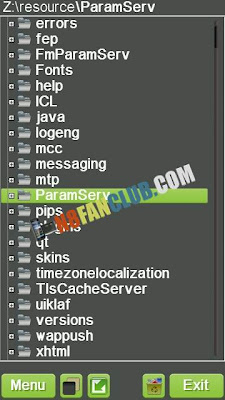
2. Open X-plore and copy ParamServ folder from Z:/resource as shown in the image above to C:/resource. – N8 Fan Club – – N8 Fan Club –
3. From the download package copy SYS & RESOURCE folders to root C:/ via X-plore and it will ask you to overwrite hrv_gain_tunings.rsc, just overwrite it. – N8 Fan Club –
4. From the download package open E folder & then copy Patches folder to root E:/
5. Open ROM Patcher & enable ChangeSoundParametersPath.rmp patch till it turns green, now touch options Add to Auto (DomainSrv) & you’ll observe a pink circle around the green tick.
6. Restart your Symbian Belle Smart Phone & Enjoy boosted sound volume in your headphones!
Download
N8FanClub.com_Increase_Headphones_Volume_in_Nokia_N8_Belle_Patch.zip
N8FanClub.com_Increase_Headphones_Volume_in_Nokia_N8_Belle_Patch.zip
How To Install Mod v2: (More Bass & Softness in Sound)
1. Make sure your device is unlocked with Norton Hack and you have enabled access to restricted folders by applying OPEN4ALL patch from ROM Patcher. – N8 Fan Club –
2. Open X-plore and copy ParamServ folder from Z:/resource as shown in the image above to C:/resource. – N8 Fan Club – – N8 Fan Club –
3. From the download package copy SYS & RESOURCE folders to root C:/ via X-plore and it will ask you to overwrite number of files, just overwrite them all. – N8 Fan Club –
4. From the download package open E folder & then copy Patches folder to root E:/
5. Open ROM Patcher & enable ChangeSoundParametersPath.rmp patch till it turns green, now touch options Add to Auto (DomainSrv) & you’ll observe a pink circle around the green tick.
6. Restart your Symbian Belle Smart Phone & Enjoy boosted sound volume in your headphones!
done everything perfectly. No change -.-
done everything perfectly. No change at all -.-
done everything perfectly. No change
its work perfect but now i can’t install unsigned applications. So please help.
copy C:/patches folder to E:/
Where is this Z: drive .. ? I cudnt find it.. I hav oly E and C drive in my N8 ..
head phone not worrking…..even headphone symbol not coming…. help….
bt there is no sys and resourcefolder in download package .. There are just number of files…pllzz help
Hi admin ! i’m using belle refresh ( cfw, with sysap mod or something like that) and i read ths thread : http://www.modding-extrax7.blogspot.com/2012/04/sound-inprovement-v1-for-headset.html
been wondering if i must do the same process and if it’s safe to do that 🙂 thanks !
could this work with Nokia Belle Refresh software version 111.040.1511 because my headset volume is just way to low? Also does anyone have a download link that actually works.
Yes it will definitely work!
Ok but all the download links don’t work, where do I get the files needed, I’ve googled and searched everywhere, maybe to old?
I just have updated the new links, I hope you can easily download now.