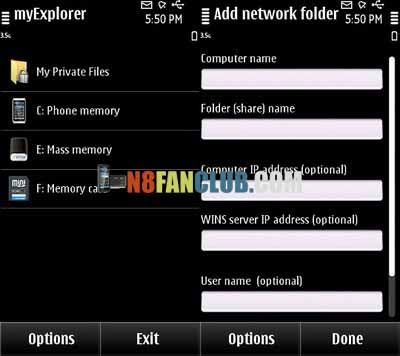
myExplorer is an advanced network (LAN) file manager.Major features:
1. Wi-Fi file transfer. You can open, copy or move files between the phone and a PC (XP, Vista, Windows 7, Mac OS X or Linux). There is no need to install any software on the computer.
2. Password-protected folder for private information.
3. Advanced text viewer with custom encoding (including Cyrillic), font size and color, and smart reflow.
4. Open, view and extract files from Zip, Rar, 7z, Tar, Gz and Bz2 archives.
1. Wi-Fi file transfer. You can open, copy or move files between the phone and a PC (XP, Vista, Windows 7, Mac OS X or Linux). There is no need to install any software on the computer.
2. Password-protected folder for private information.
3. Advanced text viewer with custom encoding (including Cyrillic), font size and color, and smart reflow.
4. Open, view and extract files from Zip, Rar, 7z, Tar, Gz and Bz2 archives.
What’s New:
• New user interface based on the guidelines Belle.
• Fixed a bug that caused the freezing process of copying large files.
• Added support for Windows-1250 encoding for viewing text files
• Many other small improvements and bug fixes.
• Added the “Privacy Policy” in the online help form for adding a network folder.
• New user interface based on the guidelines Belle.
• Fixed a bug that caused the freezing process of copying large files.
• Added support for Windows-1250 encoding for viewing text files
• Many other small improvements and bug fixes.
• Added the “Privacy Policy” in the online help form for adding a network folder.
Direct Download
N8FanClub.com_myExplorer_2.10_S3_Anna_Belle_Signed.sis
N8FanClub.com_myExplorer_2.10_S3_Anna_Belle_Signed.sis
N8FanClub.com_myExplorer_2.10_S3_Anna_Belle_Signed.sis
N8FanClub.com_myExplorer_2.10_S3_Anna_Belle_Signed.sis
hey any bdy help me….hw can i transver files through wifi….plz give me the details….
you need to set all the details when you add, try searching on mapping drives in windows, it will give you a very big head start, eg computer name is your computers name in windows, you can find this by right clicking my computer, then computer name, then you right click on one of your directories in windows explorer and go to sharing, this information will be the same in my explorer. Your windows logon and password on your computer are used in explorer too. i cant remember because im in my first 10 mins of installing my os on my phone but you might need to put ‘\\’ in front of your computer name and ‘\’ in front of your share name, give it a whril