
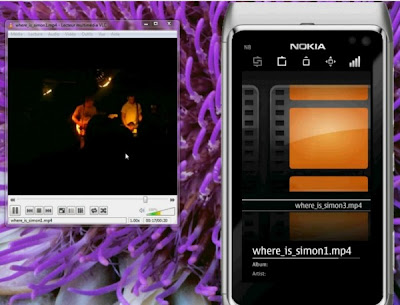
VLC Player remote control app (for VLC Player v2 or newer). VLC Remote app for Symbian allows you to control VLC client on your PC from your smartphone! Control your VideoLAN Client player with your Symbian device. Or even turn it into a media center with the help of HomeMedia!
With this app you can:
– to control current track: play, stop, next, etc.
– to control play mode: random, repeat, etc.
– to see current cover art & track info
– to see and manage current playlist
1. Installation
Download and install the latest VideoLan Player on your PC.
2. Easy Setup:
- Download the vlc.zip file
- Go to “<directory_of_vlc>” and copy the files of the vlc.zip into that directory => Replace two existing (hidden?) files (.hosts located in “http” folder; status.xml located in “http/requests” folder)
- Now open the VLC Player and open “Tools >> Preferences
- Select “Show settings *All” in the bottom left corner
- Select “Interface >> Main interfaces“
- Make sure in the Drop-Down menu for main interfaces “Default” is selected => Don’t select “Http remote control interface” unless you don’t want to have a graphical interface for VLC, just the web control
- Select in the group “Extra interface modules” “Http remote control interface” => This enables the web interface automatically on VLC-startup as an extra interface
- Save the settings and restart VLC
- Go to http://localhost:8080/requests/status.xml (default port of VLC) to check if the web interface is working
- Go to http://[ip-address]:8080/requests/status.xml (default port of VLC) to check if the web interface is working for another device => If it doesn’t work the security settings in the “.host” file are bad – overwrite the file with the “.hosts” file in vlc.zip
- See this Video for more information:
Download
N8FanClub.com_VLCRemote_1.1.1_offline_signed.zip
N8FanClub.com_VLCRemote_1.1.1_offline_signed.zip
N8FanClub.com_VLCRemote_1.1.1_offline_signed.zip
N8FanClub.com_VLCRemote_1.1.1_offline_signed.zip